Series: AI Agents as a Security Force Multiplier. Post 5. Originally published on LinkedIn.
The issue. GRC platforms confirm default encryption is on. They don’t audit the actual state of every resource. Pre-policy snapshots, forgotten non-prod RDS instances, and legacy EBS volumes stay unencrypted.
The implication. PCI DSS 3.5 and SOC 2 CC9.1 require encryption at rest wherever data lives. Your QSA queries actual state, not defaults. Every historical gap surfaces during fieldwork.
The solution. An AI agent with read-only AWS CLI access queries the encryption state of every resource and produces the evidence package before your auditor asks.
The Prompt
The following prompt chain drives the encryption compliance sweep. These were run against a Claude Code instance with read-only AWS CLI access configured. The same chain works in any harness with tool-use and multi-step reasoning: OpenClaw, Hermes, or any MCP-connected client.
Prompt 1: Collect encryption state
You have read-only AWS CLI access to the account. Do not analyze yet. Collect the following raw data and confirm when each step is complete:
- List all EBS volumes: encryption status, state, attached instance ID, volume ID, size, creation time
- List all EBS snapshots owned by this account: encryption status, source volume ID, creation date, description
- List all RDS instances: encryption status, engine, instance class, Multi-AZ, instance identifier, KMS key
- List all RDS clusters (Aurora): encryption status, engine, cluster identifier, KMS key
- List all RDS snapshots: encryption status, engine, source instance, creation time
- List all S3 buckets; for each, pull the default encryption configuration, the bucket policy (look for aws:SecureTransport enforcement), and the public access block settings
- List all SSM Parameter Store parameters: name, type (String vs SecureString), KMS key, last modified date
- List all customer-managed KMS keys; for each, pull key metadata and auto-rotation status
Prompt 2: Analyze and generate evidence package
Using the data you collected, generate a structured evidence package. For each finding category, produce a table and include the relevant PCI DSS and SOC 2 control citation.
- Unencrypted EBS volumes (Encrypted: false). Include volume ID, state, attached instance if any, size, and age in days. (PCI 3.5.1, SOC 2 CC9.1)
- Unencrypted EBS snapshots. Include snapshot ID, source volume, creation date, and description. Note the total count and the oldest snapshot date. (PCI 3.5.1, SOC 2 CC9.1)
- Unencrypted RDS instances and clusters. Flag each as HIGH priority: RDS encryption cannot be enabled in place; remediation requires a snapshot and restore to a new encrypted instance. (PCI 3.5.1, SOC 2 CC9.1)
- S3 buckets missing default encryption or missing a bucket policy that enforces aws:SecureTransport. Separate the two gaps in the table. (PCI 3.5.1, SOC 2 CC9.1)
- SSM Parameter Store parameters where the name suggests credentials (contains “password,” “secret,” “key,” “token,” or “credential”) but the type is String rather than SecureString. These are unencrypted at rest. Flag borderline names (for example, “connection_string,” “host,” “endpoint”) separately for manual review rather than treating them as findings. (PCI 3.4, SOC 2 CC6.7)
- Customer-managed KMS keys with automatic rotation disabled. Include key alias and age in days. (PCI 3.7.1, SOC 2 CC6.7)
What the Agent Runs
The agent executes a sequence of AWS CLI calls, reasons about what it finds, and produces a structured report. No manual spreadsheet work. No copy-paste from the console.
Step 1: EBS volume encryption
# All EBS volumes (running, available, and in-use)
aws ec2 describe-volumes \
  --query 'Volumes[*].{ID:VolumeId,Encrypted:Encrypted,State:State,InstanceId:Attachments[0].InstanceId,KmsKey:KmsKeyId,Size:Size}' \
  --output json

# Default encryption setting for the account/region
aws ec2 get-ebs-encryption-by-default --output json

# Default KMS key used for EBS
aws ec2 get-ebs-default-kms-key-id --output json
The agent flags any volume where Encrypted: false, whether it’s attached to a running instance or sitting unattached in an available state. Both matter. An unattached unencrypted volume still contains data.
Step 2: EBS snapshot encryption
# All snapshots owned by this account
aws ec2 describe-snapshots \
  --owner-ids self \
  --query 'Snapshots[*].{ID:SnapshotId,Encrypted:Encrypted,VolumeId:VolumeId,StartTime:StartTime,Description:Description}' \
  --output json
Snapshots are the most common surprise finding. Encryption policies applied today don’t retroactively encrypt snapshots taken last year. The agent surfaces every unencrypted snapshot with its creation date, so you can see exactly how far back the gap goes.
Step 3: RDS encryption at rest
# All RDS instances
aws rds describe-db-instances \
  --query 'DBInstances[*].{ID:DBInstanceIdentifier,Encrypted:StorageEncrypted,Engine:Engine,KmsKey:KmsKeyId,Status:DBInstanceStatus,MultiAZ:MultiAZ}' \
  --output json

# RDS snapshots
aws rds describe-db-snapshots \
  --owner self \
  --query 'DBSnapshots[*].{ID:DBSnapshotIdentifier,Encrypted:Encrypted,Engine:Engine,InstanceId:DBInstanceIdentifier,CreateTime:SnapshotCreateTime}' \
  --output json

# Aurora clusters
aws rds describe-db-clusters \
  --query 'DBClusters[*].{ID:DBClusterIdentifier,Encrypted:StorageEncrypted,Engine:Engine,KmsKey:KmsKeyId}' \
  --output json
RDS encryption cannot be enabled on a running instance. An unencrypted RDS database requires a snapshot, a restore to a new encrypted instance, and a cutover to remediate. The agent flags these as high priority because fixing them requires downtime planning, not a quick configuration change.
Step 4: S3 bucket encryption
# List all buckets
aws s3api list-buckets --query 'Buckets[*].Name' --output json

# For each bucket, default encryption config
aws s3api get-bucket-encryption --bucket <bucket-name> --output json

# S3 Block Public Access (belt-and-suspenders)
aws s3api get-public-access-block --bucket <bucket-name> --output json

# Bucket policy: check for enforcement of encryption in transit
aws s3api get-bucket-policy --bucket <bucket-name> --output json
The agent checks three things per bucket: default encryption enabled, which algorithm (SSE-S3 vs SSE-KMS), and whether the bucket policy enforces aws:SecureTransport for encryption in transit. The transit policy is frequently missing even when at-rest encryption is in place.
Step 5: Parameter Store SecureString vs String
aws ssm describe-parameters \
  --query 'Parameters[*].{Name:Name,Type:Type,KeyId:KeyId,LastModified:LastModifiedDate}' \
  --output json
This catches a common pattern: developers storing secrets as String type in Parameter Store instead of SecureString. String values are stored in plaintext, and any caller with ssm:GetParameter on the resource reads them directly. SecureString adds a kms:Decrypt requirement on the encrypting key, which is the layer most orgs enforce with least-privilege KMS policies. When secrets end up as String, that KMS gate is skipped entirely.
Step 6: KMS key health
# All customer-managed KMS keys
aws kms list-keys --output json

# For each key
aws kms describe-key --key-id <key-id> --output json
aws kms get-key-rotation-status --key-id <key-id> --output json
The agent flags CMKs with automatic rotation disabled. PCI and SOC 2 both expect periodic key rotation. AWS-managed keys rotate automatically. Customer-managed keys do not, unless explicitly configured.
What the Agent Produces
From all of that, the agent generates a structured evidence package.
Finding 1: Unencrypted EBS volumes
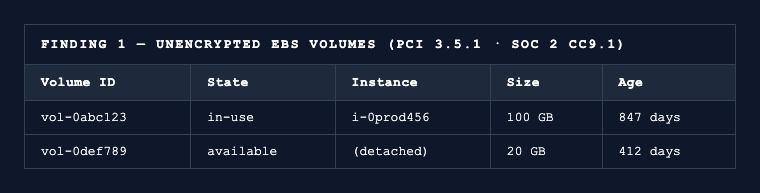
PCI 3.5.1 · SOC 2 CC9.1
Finding 2: Unencrypted EBS snapshots
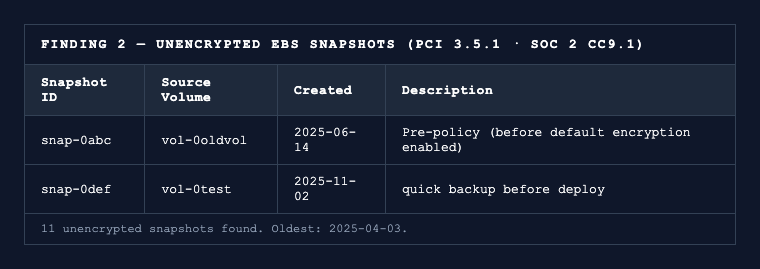
11 unencrypted snapshots found. Oldest: 2025-04-03.
PCI 3.5.1 · SOC 2 CC9.1
Finding 3: Unencrypted RDS instances
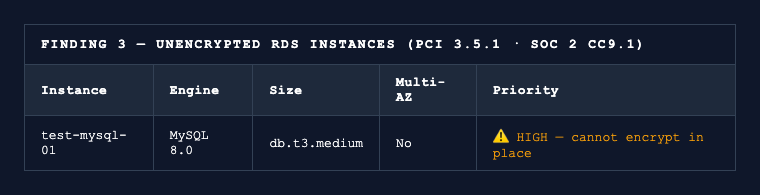
PCI 3.5.1 · SOC 2 CC9.1
Finding 4: S3 encryption gaps
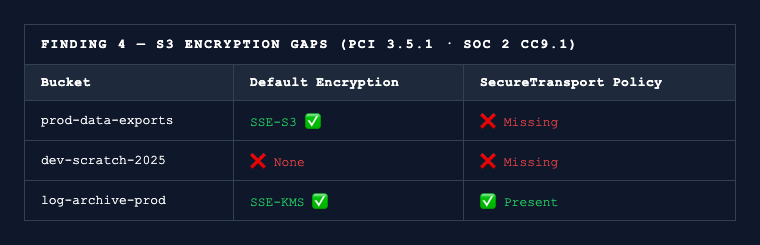
PCI 3.5.1 · SOC 2 CC9.1
Finding 5: Plaintext Parameter Store secrets
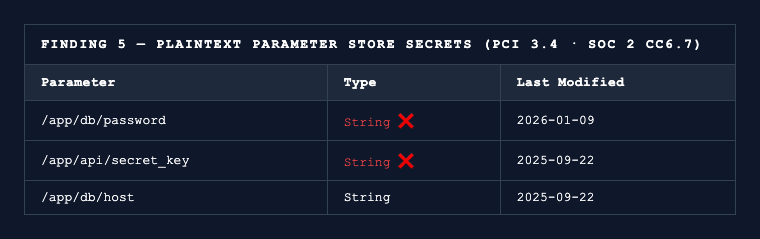
PCI 3.4 · SOC 2 CC6.7
Finding 6: KMS keys without rotation
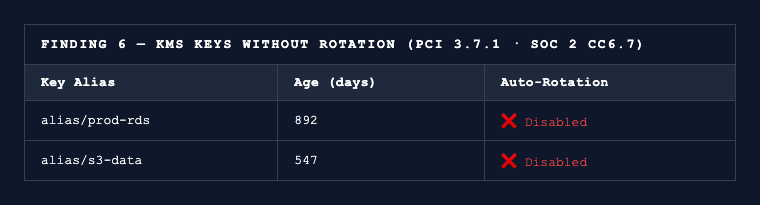
PCI 3.7.1 · SOC 2 CC6.7
Why Encryption Findings Are Uniquely Painful
Most audit findings have clean fixes. Bad security group rule? Update it. User missing MFA? Enroll them. Encryption is different. You cannot encrypt a running RDS instance in place: remediation is snapshot, restore to new encrypted instance, cut over. That’s a maintenance window scheduled weeks out, not a gap you close during fieldwork. EBS root volumes require stopping the instance. Pre-policy snapshots require copy-with-encryption, validate, delete, one at a time.
Vanta and Drata monitor whether default EBS encryption is enabled at the account level. They don’t surface the snapshot from 14 months ago that predates the policy, or the test RDS instance in a non-prod account no one remembers spinning up. Those are the findings that hit hardest, because they take the longest to fix.
Run this sweep a quarter before your QSA arrives, and you have time to schedule the RDS migration and work through the snapshot backlog. The week before fieldwork, you don’t.
The Permission Model
{
  "Version": "2012-10-17",
  "Statement": [
    {
      "Effect": "Allow",
      "Action": [
        "ec2:DescribeVolumes",
        "ec2:DescribeSnapshots",
        "ec2:GetEbsEncryptionByDefault",
        "ec2:GetEbsDefaultKmsKeyId",
        "rds:DescribeDBInstances",
        "rds:DescribeDBClusters",
        "rds:DescribeDBSnapshots",
        "s3:ListAllMyBuckets",
        "s3:GetEncryptionConfiguration",
        "s3:GetBucketPolicy",
        "s3:GetPublicAccessBlock",
        "ssm:DescribeParameters",
        "kms:ListKeys",
        "kms:DescribeKey",
        "kms:GetKeyRotationStatus"
      ],
      "Resource": "*"
    }
  ]
}
What’s Next in This Series
Each of the following follows the same pattern: read-only AWS CLI access, the agent reasons over the output, structured evidence comes out the other side.
- Logging completeness: CloudTrail coverage, log file integrity, CloudWatch alarms (PCI Req 10)
- Security group exposure: internet-reachable compute,
0.0.0.0/0analysis (PCI Req 1.3) - Pre-audit gap report: all checks combined, automated, run the week before your QSA arrives
The pattern holds across every control area. AWS surfaces this data through the API regardless of whether you pull it before fieldwork or during it. Your QSA will find the same encryption gaps either way. The question is whether you’ll have the runway to fix the RDS ones.
Preparing for a PCI DSS or SOC 2 audit and need help closing control gaps like this one? See how 543HQ builds compliance programs.
Need a hand with this at your company?
543HQ helps startups and growing companies build security programs that actually work. Start with a free 30-minute call.
Book a Free Call