Series: GuardDuty Alert Triage: CloudTrail + EDR. Post 2 of 6.
Detection Context
Impact:S3/AnomalousBehavior.Delete is a different category of finding from S3 exfiltration alerts. S3 exfiltration is bad. S3 mass deletion can be unrecoverable. That asymmetry changes everything about how you triage it.
GuardDuty fires this finding when an IAM entity deletes S3 objects at a volume or rate anomalous relative to that entity’s 14-day behavioral baseline. Two conditions trigger it:
- Volume spike: The entity issues far more
DeleteObjectorDeleteObjectscalls than its baseline average in a short window. - New bucket access: The entity deletes objects from a bucket it has not accessed before.
This is not a finding about normal application-level lifecycle management. A nightly Lambda cleaning up temp files will not trigger this. A credential-holder suddenly bulk-deleting across five buckets they have never touched will.
MITRE ATT&CK: T1485, Data Destruction. Tactic: TA0040 Impact. Source: GuardDuty S3 data plane monitoring.
The Triage Inversion
Every other GuardDuty triage post in this series starts with identity: who made the call, is the key compromised, is this a known service account.
This one starts with recoverability.
The reason is operational. If the data is gone and your backup state is unknown, every minute of attribution work is a minute not spent on recovery. Answer the versioning question first. Then investigate the identity, IP, and behavioral context.
Prompt Chain
The following prompt chain drives the triage. These were run against a Claude Code instance with CrowdStrike API, CloudTrail read, and AWS S3/IAM read access. The same chain works in any harness with tool-use and multi-step reasoning: OpenClaw, Hermes, or any MCP-connected client.
Prompt 1: Pull and scope the finding
Pull the GuardDuty finding for
Impact:S3/AnomalousBehavior.Delete. Extract: IAM entity ARN, access key ID, source IP, affected bucket name(s), and the delete volume from the finding description. Then query CloudTrail for allDeleteObject,DeleteObjects, andDeleteBucketevents from that access key in a two-hour window around the alert timestamp. Summarize: total delete count, affected buckets, and the exact time window of the activity.
Prompt 2: Assess recoverability and check for tampering
For each affected bucket from Prompt 1:
- Check S3 versioning status using
get-bucket-versioning. Classify each bucket as: versioning enabled and intact, versioning suspended or disabled, or versioning never enabled.- Check whether MFA Delete is enabled on each bucket.
- Query CloudTrail for
PutBucketVersioningevents from the same access key in the 24 hours before the first deletion. If a versioning-suspend or versioning-disable call preceded the deletions, flag this immediately as intentional data destruction.- For any bucket where versioning is enabled and intact, confirm whether recovery is viable by checking whether delete markers exist on the affected objects.
Produce a recovery assessment table: bucket name, versioning state, MFA delete status, tampering detected (yes/no), and recovery verdict.
Prompt 3: Hunt the exfiltrate-then-destroy pattern and produce final verdict
For each affected bucket:
- Query CloudTrail for
GetObjectevents from the same access key in the two hours before the firstDeleteObjectevent on that bucket. Count total GetObject calls.- If GetObject volume is high on the same bucket immediately before deletion: flag as exfiltrate-then-destroy pattern. This is high-confidence malicious.
- Classify the source IP: check against corporate VPN ranges, AWS ip-ranges.json service IPs, and known CI/CD runner CIDRs.
- Apply final verdict:
- Internal IP + versioning intact + no GetObject spike + known service account pattern: INVESTIGATE (likely benign, confirm identity)
- External IP + versioning intact + no tampering: ESCALATE (credential concern, recovery viable)
- External IP + versioning tampered before deletion: ESCALATE IMMEDIATELY (intentional destruction)
- Any IP + high GetObject before deletion + then DeleteObject: ESCALATE IMMEDIATELY (exfiltrate-then-destroy)
Produce the final verdict with the key evidence supporting it.
What the Agent Runs
Step 1: Pull the GuardDuty finding
aws guardduty list-findings \
  --detector-id <detector-id> \
  --finding-criteria '{"Criterion": {"type": {"Eq": ["Impact:S3/AnomalousBehavior.Delete"]}}}'

aws guardduty get-findings \
  --detector-id <detector-id> \
  --finding-ids ["<finding-id>"]
Extract from the finding: IAM entity ARN, access key ID, bucket name(s), source IP, and the delete volume noted in the finding description. The GuardDuty finding itself does not tell you whether the data is recoverable. That requires the next step.
Step 2: Establish what was deleted and at what scale
aws cloudtrail lookup-events \
  --lookup-attributes AttributeKey=AccessKeyId,AttributeValue=<key> \
  --start-time "<finding-time minus 2 hours>" \
  --end-time "<finding-time plus 30 minutes>" \
  --query 'Events[?EventName==`DeleteObject`||EventName==`DeleteObjects`||EventName==`DeleteBucket`]' \
  --output json | python3 -c "
import json, sys
events = json.load(sys.stdin)
from collections import Counter
buckets = Counter()
for e in events:
    try:
        ct = json.loads(e['CloudTrailEvent'])
        buckets[ct['requestParameters'].get('bucketName', '?')] += 1
    except:
        pass
print(f'Total delete events: {len(events)}')
for b, c in buckets.most_common():
    print(f'{c:6d} deletes  {b}')
"
This gives you total delete event count, affected buckets, and the time window. With that information you can answer the scope question before investigating anything else.
Step 3: Check S3 versioning on each affected bucket
This is the fastest triage step. It immediately tells you whether recovery is possible.
aws s3api get-bucket-versioning --bucket <bucket-name>Three outcomes:
Status: Enabled: Deleted objects have delete markers. The objects still exist as non-current versions. Recovery is possible by removing the delete markers.Status: Suspendedor empty response: Object deletions may be permanent depending on when versioning was disabled.- No versioning ever enabled: Deletions are permanent.
Check every affected bucket. Their versioning states may differ.
Step 4: Check whether MFA Delete is enabled
MFA Delete requires a valid MFA token to permanently delete versioned objects or change the versioning configuration. If enabled, an attacker holding the access key alone cannot permanently delete version-controlled data.
aws s3api get-bucket-versioning --bucket <bucket-name> \
  --query 'MFADelete'
If the response is Enabled, versioned objects in this bucket are protected from permanent deletion without MFA. A significant constraint on blast radius.
Step 5: Check for versioning tampering before deletion
A key destruction pattern: disable versioning first, then delete. This converts a recoverable delete into a permanent one.
aws cloudtrail lookup-events \
  --lookup-attributes AttributeKey=AccessKeyId,AttributeValue=<key> \
  --start-time "<24 hours before finding>" \
  --query 'Events[?EventName==`DeleteObject`||EventName==`DeleteBucket`||EventName==`PutBucketVersioning`]' \
  --output json
If the same access key issued a PutBucketVersioning call that set versioning to Suspended or Disabled before the deletions: this is intentional data destruction. Escalate immediately. Do not wait for further analysis.
Step 6: Check for data exfiltration before deletion
Some data destruction events follow a specific sequence: access the data, copy it, then delete the originals. Check whether GetObject calls on the same bucket preceded the deletions.
aws cloudtrail lookup-events \
  --lookup-attributes AttributeKey=AccessKeyId,AttributeValue=<key> \
  --start-time "<2 hours before first delete event>" \
  --query 'Events[?EventName==`GetObject`]' \
  --output json | python3 -c "
import json, sys
events = json.load(sys.stdin)
print(f'GetObject calls before deletion: {len(events)}')
"
High GetObject volume on the same bucket immediately before DeleteObject events on that same bucket is the exfiltrate-then-destroy pattern. This is high-confidence malicious activity.
Step 7: Recovery assessment
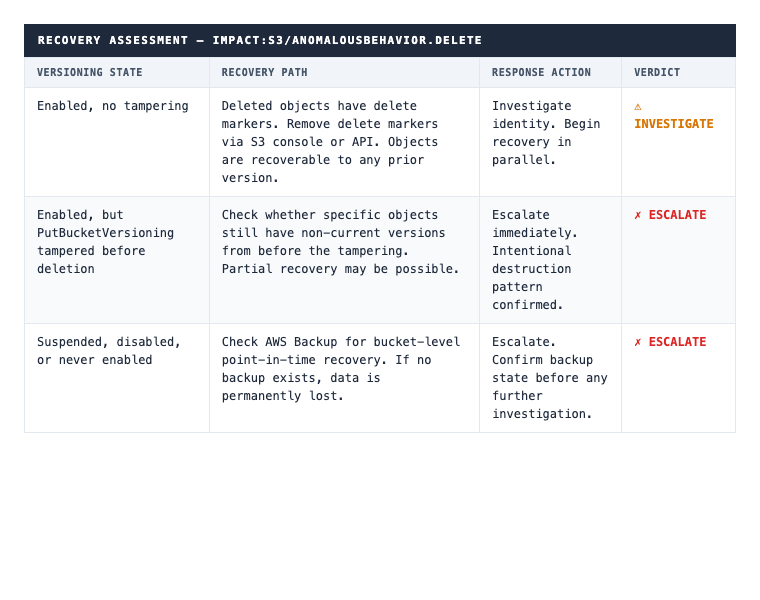
If data is confirmed permanently destroyed, the incident scope expands beyond triage into breach assessment.
CQL Hunt Queries (CrowdStrike NGSIEM LogScale)
Hunt 1: Mass S3 delete events by IAM entity
Surfaces entities with high deletion counts across any time window, not just the GuardDuty alert window.
#repo=cloudtrail
eventSource="s3.amazonaws.com"
(eventName="DeleteObject" OR eventName="DeleteObjects" OR eventName="DeleteBucket")
| groupBy([userIdentity.accessKeyId, userIdentity.arn, requestParameters.bucketName],
          function=[count(as=delete_count), min(eventTime, as=first_delete)])
| sort(delete_count, order=desc)
| delete_count > 10
Hunt 2: Versioning disable followed by deletion from the same access key
This sequence converts recoverable deletion into permanent destruction.
#repo=cloudtrail
eventSource="s3.amazonaws.com"
(eventName="PutBucketVersioning" OR eventName="DeleteObject" OR eventName="DeleteObjects")
| groupBy([userIdentity.accessKeyId, eventName],
          function=[count(as=count), min(eventTime, as=first_seen)])
| sort(first_seen, order=asc)
Review for access keys that appear in both PutBucketVersioning and delete events. Sort ascending to see the temporal order. Versioning change before deletions confirms the intentional pattern.
Hunt 3: Exfiltrate-then-destroy: GetObject then DeleteObject, same key, same bucket
#repo=cloudtrail
eventSource="s3.amazonaws.com"
(eventName="GetObject" OR eventName="DeleteObject")
| groupBy([userIdentity.accessKeyId, requestParameters.bucketName, eventName],
          function=[count(as=count), min(eventTime, as=first_time)])
| sort(first_time, order=asc)
Look for access keys where both GetObject and DeleteObject appear on the same bucket, with GetObject timestamps earlier than DeleteObject timestamps. That sequence, read then destroy, is the highest-confidence destructive pattern in this finding type.
The First Question
Every other triage step depends on the answer to one question: is the deleted data recoverable?
If versioning is enabled and intact, you have time to investigate before recovery becomes urgent. The data exists as non-current versions.
If versioning was tampered or never enabled, recovery urgency increases immediately. Confirming backup state and starting the restore process matters more right now than attribution.
Check versioning first. If PutBucketVersioning appears before the deletions, stop investigating and escalate.
Want agentic triage running on your GuardDuty findings? See how 543HQ builds security automation pipelines.
Need a hand with this at your company?
543HQ helps startups and growing companies build security programs that actually work. Start with a free 30-minute call.
Book a Free Call