Series: GuardDuty Alert Triage with AI Agents. Post 5 of 6.
Post 4 covered runtime execution findings caught at the process level: reverse shells, suspicious tool spawns, EDR-sourced alerts where the evidence was already assembled in Falcon. This post is different. Both findings here use indirect signals: DNS resolution behavior and API call pattern deviation, where GuardDuty gives you the “what” but the “why” takes several lookup steps to establish.
The two finding types have nothing in common operationally. One fires when an EC2 instance queries a phishing domain. The other fires when an IAM user’s API activity drifts outside their established baseline. They’re covered together because each produces a single alert in a typical environment (not a cluster, not a campaign), which means they don’t justify standalone posts. They do, however, each require distinct triage paths that are worth documenting.
Finding Type 1: Trojan:EC2/PhishingDomainRequest!DNS
What Triggers This Finding
An EC2 instance made a DNS query for a domain GuardDuty has classified as phishing infrastructure. GuardDuty cross-references VPC DNS queries against its threat intelligence feed. When a host resolves a domain on that list, the finding fires.
Two details that matter for triage:
- A connection does not need to be established. The DNS resolution attempt is sufficient to trigger the finding.
- The finding includes which threat list the domain came from: GuardDuty’s own feed or a custom list you configured.
This distinction matters because a DNS query without a subsequent TCP connection is a different risk level than a host that resolved the domain and then established a session with the resulting IP.
What CrowdStrike Provides
If the alert routes through Falcon, you get: display_name, severity_name, source_products: ["Aws Guardduty"], and falcon_host_link. No DNS domain, no instance ID. Both are in the GuardDuty finding itself, not the Falcon alert.
Finding Type 2: Impact:IAMUser/AnomalousBehavior
What Triggers This Finding
An IAM user made API calls in the impact category (modification, deletion, encryption) and the pattern deviates significantly from what GuardDuty has established as normal for that user.
This is broader than the S3-specific findings covered in Post 2. IAMUser/AnomalousBehavior covers any service: unusual EC2 modifications, unexpected RDS operations, cross-service API sequences. It fires on any combination of impact-category calls that fall outside the user’s ML-derived baseline.
Because the baseline is user-specific, the same API call can be benign for one identity and anomalous for another. A DeleteDBInstance call from a database admin looks routine in CloudTrail. From a developer account that has never touched RDS, it does not.
The Prompt Chain
The following prompts drive the triage for both finding types. These were run against a Claude Code instance with CrowdStrike API, AWS CLI, and CloudTrail read access. The same chain works in any harness with tool-use and multi-step reasoning: OpenClaw, Hermes, or any MCP-connected client.
Prompt 1: Pull and characterize the GuardDuty findings
Pull the GuardDuty finding for
Trojan:EC2/PhishingDomainRequest!DNSandImpact:IAMUser/AnomalousBehavior. For each finding, extract the key fields: instance ID or IAM username, the specific trigger action (DNS domain queried or API call name), source IP where applicable, the threat list name for the DNS finding, and the finding timestamp.Confirm both findings are retrieved before proceeding. Note whether either shares an instance ID, access key, or source IP with other open findings.
Prompt 2: DNS Finding Investigation, Follow-Through and Process Attribution
For the
PhishingDomainRequest!DNSfinding:
- Resolve the phishing domain to its current IP using dig.
- Query VPC Flow Logs for the EC2 instance for any ACCEPT entries from that instance to the resolved IP, starting from the DNS query timestamp and running 30 minutes forward. Determine: did the host connect, or did it only resolve?
- If the instance has a Falcon agent, query Falcon Alerts for DNS telemetry on that device in the 5-minute window around the finding timestamp. Identify which process issued the query.
- Query VirusTotal for the domain: creation date, registrar, classification category, vendor verdict count.
- If the host is a web server or application server, note that application-level outbound calls (webhooks, SSRF) require a different remediation path than user-process DNS queries.
Summarize: query-only or query-plus-connection, process responsible, domain age and reputation verdict.
Prompt 3: IAM Finding Investigation, Session Analysis and Source IP Classification
For the
Impact:IAMUser/AnomalousBehaviorfinding:
- Pull all CloudTrail events for the IAM user in a 4-hour window centered on the finding timestamp. Extract the triggering API call name from the finding.
- From the CloudTrail session, rank all API calls by frequency. Identify whether the anomalous call was isolated or part of a broader unusual session.
- Run
list-access-keysandget-access-key-last-usedfor the IAM user. Note whether the key is still active and when it was last used relative to the finding.- Compare the source IP in the finding against the user’s historical API call origins from CloudTrail. Classify the source: internal RFC 1918, known cloud region egress, or external-unknown.
- Apply the decision matrix: does the API call match the user’s job function? Does the source IP match their normal call origin? Are there other open GuardDuty findings for this identity?
Return a verdict with supporting evidence.
What the Agent Runs
DNS Finding: Steps 1-5
Step 1: Pull the GuardDuty finding
aws guardduty get-findings \
  --detector-id <detector-id> \
  --finding-ids ["<id>"]
Extract:
| Field | Value |
|---|---|
resource.instanceDetails.instanceId |
Which EC2 instance queried the domain |
service.action.dnsRequestAction.domain |
The phishing domain |
service.action.dnsRequestAction.protocol |
Usually UDP |
service.additionalInfo.threatListName |
Which threat list flagged the domain |
Step 2: Determine whether a connection followed the DNS query
Resolve the domain to get its IP, then check VPC Flow Logs for outbound TCP connections:
dig +short <phishing-domain>

aws logs filter-log-events \
  --log-group-name /vpc/flow-logs/<vpc-id> \
  --filter-pattern "[v, a, eni, src, dst=<resolved-ip>, srcport, dstport, proto, pkts, bytes, start, end, action, status]"
If VPC Flow Logs show an ACCEPT entry from the EC2 instance to the phishing domain’s IP after the DNS query timestamp, the host made contact. No TCP entry means the host resolved but did not connect.
DNS query only: investigation priority is moderate. DNS query plus TCP session: treat as active C2 or payload delivery.
Step 3: Identify what process made the DNS query
If the EC2 instance has a Falcon agent:
GET /alerts/queries/alerts/v2
filter: "device_id:'<device-id>'+created_timestamp:>='<finding-time minus 5 minutes>'"
Falcon DNS telemetry identifies which process issued the query. Process name plus domain plus connection status gives you the full picture: browser, system process, cron job, or something else.
Step 4: Check domain reputation
GuardDuty labeled it phishing, but confirm with a second source:
curl "https://www.virustotal.com/api/v3/domains/<phishing-domain>" \
  -H "x-apikey: <VT_KEY>"
Check creation date, registrar, category classifications, and sandbox analysis links. A domain registered within the past 30 days with phishing categorization across multiple vendors is a strong true-positive signal.
Step 5: Check for delivery context
If the host is a web server or application server, check application logs for recently fetched external URLs. A phishing domain query that originates from an application making an outbound HTTP call (webhook, SSRF) has a different remediation path than one initiated by a user process.
One thing worth checking when you see a PhishingDomainRequest!DNS alongside other open findings in the same window: check whether the EC2 instance ID matches any other active finding. A host resolving a phishing domain is consistent with a host communicating with C2 infrastructure. These findings may be facets of the same compromise event, not independent incidents.
IAM Finding: Steps 1-5
Step 1: Pull the GuardDuty finding
aws guardduty get-findings \
  --detector-id <detector-id> \
  --finding-ids ["<id>"]
Extract:
| Field | Value |
|---|---|
resource.accessKeyDetails.userName |
The IAM user |
resource.accessKeyDetails.accessKeyId |
The access key used |
service.action.awsApiCallAction.api |
The specific API call that triggered anomaly detection |
service.action.awsApiCallAction.remoteIpDetails |
Source IP of the call |
The API call name is the primary triage pivot. The finding tells you what was called. The triage workflow tells you whether that call was normal for that identity.
Step 2: Pull all CloudTrail events for this user in a 4-hour window
aws cloudtrail lookup-events \
  --lookup-attributes AttributeKey=Username,AttributeValue=<iam-username> \
  --start-time "<finding-time minus 4 hours>" \
  --end-time "<finding-time plus 1 hour>" \
  --output json | python3 -c "
import json, sys
from collections import Counter
events = json.load(sys.stdin)
print(f'Total API calls: {len(events[\"Events\"])}')
actions = Counter(e['EventName'] for e in events['Events'])
for action, count in actions.most_common(20):
    print(f'{count:5d}  {action}')
"
This produces a ranked list of API calls by frequency. A single anomalous call in a session of 500 routine ones is a different severity than a session where every call is unusual.
Step 3: Check whether the access key is still active
aws iam list-access-keys --user-name <iam-username>
aws iam get-access-key-last-used --access-key-id <key-id>
If the key is active and LastUsedDate is at or after the finding timestamp, the key may still be in use by whoever triggered the anomaly.
Step 4: Evaluate the source IP
The source IP in the GuardDuty finding is the most direct indicator of credential origin. Compare it against the user’s historical API call origins from CloudTrail.
An IAM user whose CloudTrail history shows calls consistently from internal RFC 1918 address space, now making calls from an external IP, is a strong indicator of credential theft. An IAM user whose history shows calls from multiple cloud regions and external IPs, likely a developer using a VPN or CI/CD from multiple locations, is not.
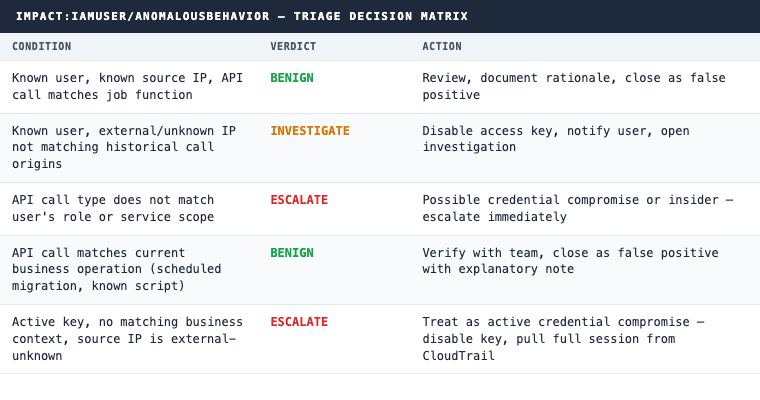
Step 5: Apply the decision matrix
CQL Hunt Queries
DNS Queries to Non-Standard Domains from EC2 Hosts
#repo=search-all
event.simpleName=DnsRequest
ComputerName=~wildcard("*.ec2.internal")
DomainName!="amazonaws.com"
DomainName!="awsstatic.com"
| groupBy([ComputerName, DomainName],
          function=[count(as=query_count), min(timestamp, as=first_seen)])
| sort(query_count, order=desc)
This surfaces all non-standard DNS resolution from EC2 hosts. Add domain length or TLD filters to narrow results toward newly registered or algorithmically generated domains.
IAM User API Calls from External IP Addresses
#repo=cloudtrail
userIdentity.type="IAMUser"
NOT sourceIPAddress=~wildcard("10.*")
NOT sourceIPAddress=~wildcard("172.1*")
NOT sourceIPAddress=~wildcard("192.168.*")
NOT sourceIPAddress=~wildcard("*.amazonaws.com")
| groupBy([userIdentity.userName, sourceIPAddress, eventSource],
          function=[count(as=api_calls), collect([eventName])])
| sort(api_calls, order=desc)
IAM User Data-Impact Calls Outside Business Hours
#repo=cloudtrail
userIdentity.type="IAMUser"
(eventName=~wildcard("Delete*")
 OR eventName=~wildcard("Put*")
 OR eventName=~wildcard("Create*"))
| hour := formatTime("%H", eventTime, timezone="America/Chicago")
| NOT (hour >= "08" AND hour <= "18")
| groupBy([userIdentity.userName, eventName, sourceIPAddress],
          function=[count(as=count)])
| sort(count, order=desc)
This third query identifies impact-category API calls outside normal business hours. In environments where no automated jobs run overnight, any results are worth reviewing; tune the timezone and hour window for your environment.
The Decision Logic
For the DNS finding, two variables drive the verdict: did the host connect after resolving, and what process issued the query. A cron job that resolves a phishing domain without connecting is a different response than a user process that resolved and established a TCP session.
For the IAM finding, the API call type is everything. DeleteDBInstance from a developer account that has never touched RDS is not the same risk as PutObject from the same account. GuardDuty tells you the call deviated from baseline. The triage workflow tells you whether that deviation makes sense given the user’s role, source IP, and the surrounding session context.
Both finding types can produce false positives. Security tooling that does broad DNS lookups for threat intelligence purposes will occasionally resolve phishing domains. Developers running one-off administrative scripts will occasionally trigger IAM anomaly detections. The workflow above is designed to distinguish those cases from actual compromise, not by eliminating false positives at the detection layer, but by enriching each alert with the context that makes the verdict defensible.
The IAM finding that lands in isolation, weeks before or after any other cluster, is still worth the enrichment step. Access key creation date, source IP history, and the specific API call type may produce a clean close or may surface something older that was missed the first time around.
Interested in automated enrichment and triage for your GuardDuty environment? See how 543HQ builds these workflows.
Need a hand with this at your company?
543HQ helps startups and growing companies build security programs that actually work. Start with a free 30-minute call.
Book a Free Call