Series: GuardDuty Alert Triage, CloudTrail + EDR. Post 6 of 6. The capstone. Posts 1, 2, 3, 4, and 5 cover each finding type individually.
Take a production AWS environment with a steady stream of GuardDuty alerts. In a typical backlog scenario, you might have two dozen alerts across three months, roughly 80% of them still open. A handful get closed by Falcon Complete, but the closure reason is “benign activity” and you’re not entirely sure that means what it sounds like. The specific findings are still there. Nothing has actually been triaged to a verdict.
That is the starting point for this series. Posts 1 through 5 covered each alert type in isolation: S3 exfiltration, S3 destruction, Backdoor C2, Runtime execution, and the combined Trojan DNS / IAM anomaly post. This post ties them together into a single decision tree, a consolidated CQL playbook, and an automation blueprint you can implement in whatever harness you’re running.
The False Positive That Wasn’t
Before the decision tree: one clarification on a pattern that generates confusion in CrowdStrike-integrated GuardDuty deployments.
When Falcon Complete closes an alert tagged AWS-GUARDDUTY-RUNTIME-HIGH-SEV-FINDING with a disposition of “FC-Threat-Other Benign Activity / FC-Type-NonMalicious,” that reads like a false positive determination on the underlying GuardDuty finding. It is not.
AWS-GUARDDUTY-RUNTIME-HIGH-SEV-FINDING is a CrowdStrike NGSIEM correlation rule. It fires on any High severity GuardDuty Runtime finding. It is a wrapper, a second alert on top of the specific finding alert you already have. When Falcon Complete resolves it as benign, that disposition applies to the correlation rule alert, not to the underlying finding.
In practice: a Execution:Runtime/ReverseShell alert in your CrowdStrike queue can coexist with a closed AWS-GUARDDUTY-RUNTIME-HIGH-SEV-FINDING on the same event. The specific finding with process name, executable path, and network destination is still open. If you are tracking alert closure rate and counting the correlation rule closures as resolved findings, you are undercounting your open work.
Check the specific finding IDs. The correlation rule wrapper closing is not the same as the underlying finding closing.
Triage Decision Tree
Every triage in this series starts from the same point: a CrowdStrike alert with source_products: ["Aws Guardduty"] and no AWS resource context in the alert body. The first call is always aws guardduty get-findings. After that, the finding type determines the log source and triage path.
GuardDuty alert received via CrowdStrike webhook
|
+-- Parse finding type from display_name
|
+-- S3 Findings (Policy:S3/*, Stealth:S3/*)          [Post 1, Post 2]
|   +-- Log source: CloudTrail S3 data events
|   +-- Pivot: accessKeyId -> CloudTrail lookup-events
|   +-- Quantify: GetObject count, DeleteObject events, versioning changes
|   +-- Decision: volume anomaly + auth source + versioning disabled = escalate
|
+-- Backdoor / C2 Findings (Backdoor:EC2/*)           [Post 3]
|   +-- Log source: VPC Flow Logs + Falcon Insight network events
|   +-- Pivot: instanceId -> outbound connection details + Falcon alerts
|   +-- Key field: remoteIpDetails + connection frequency
|   +-- Decision: repeated outbound to same external IP = C2 = contain + escalate
|
+-- Runtime Findings (Execution:Runtime/*)            [Post 4]
|   +-- Log source: Falcon Insight process telemetry + VPC Flow Logs
|   +-- Pivot: instanceId -> Falcon device ID -> process tree + RTR netstat
|   +-- Key field: parentProcess.name (determines delivery method)
|   +-- Decision: shell in ESTABLISHED state + Falcon detection = contain + escalate
|
+-- IAM Findings (Impact:IAMUser/*)                   [Post 5]
|   +-- Log source: CloudTrail management events
|   +-- Pivot: accessKeyId + userName -> CloudTrail lookup-events +/-4h window
|   +-- Key field: API call type + source IP vs. user baseline
|   +-- Decision: external IP + impact-class API = disable key + escalate
|
+-- EC2 DNS Findings (Trojan:EC2/*DNS)                [Post 5]
    +-- Log source: VPC Flow Logs + Falcon DNS events
    +-- Pivot: instanceId + domain -> dig resolution + flow log query
    +-- Key field: TCP connection to resolved IP (established vs. DNS-only)
    +-- Decision: DNS only = monitor; DNS + established TCP = escalate
The finding type is the routing key. Get that right and you know exactly which log source to hit and which pivot to run first.
The Prompt Chain
The following prompt chain drives the unified triage workflow. These were run against a Claude Code instance with CrowdStrike API, CloudTrail read, GuardDuty read, and Falcon Insight query access. The same chain works in any harness with tool-use and multi-step reasoning: OpenClaw, Hermes, or any MCP-connected client.
Prompt 1: Pull and route the alert
Pull the full GuardDuty finding for this CrowdStrike alert. Extract: finding type, resource type (S3, EC2, IAMUser), instance ID or access key ID, remote IP details if present, and severity. Then route the finding to the correct triage sub-workflow based on finding type category: S3, Backdoor, Runtime, IAM, or DNS. Confirm the route before proceeding.
Prompt 2: Run the sub-workflow for the finding type
Execute the triage sub-workflow for this finding type. The sub-workflow is:
For S3 findings: query CloudTrail for the access key ID in a 1-hour window around the alert. Count GetObject, DeleteObject, and PutBucketVersioning events. Identify source IP class (internal/external/AWS service). Flag if versioning was disabled before a delete sequence.
For Backdoor/C2 findings: query VPC flow logs for the instance ID. Extract outbound connection targets and connection frequency. Query Falcon Insight for any network detection on this device in the same window. Flag connections to the same external IP more than 3 times in 30 minutes.
For Runtime findings: find the Falcon device ID for this instance ID. Pull Falcon detections in a +/-15 minute window. Open an RTR session and run netstat -anp. Identify the parent process for any shell spawned. Flag any ESTABLISHED connection to a non-AWS external IP.
For IAM findings: query CloudTrail for this IAM username in a +/-4 hour window. Count API calls by service and operation type. Compare source IPs against the user’s 30-day baseline. Flag any impact-class API (Delete, Create, Attach, Detach) from an external IP.
For DNS findings: resolve the domain in the GuardDuty finding. Query VPC flow logs for TCP connections from the instance to the resolved IP. Query Falcon DNS events for the process that made the query. Flag if a TCP established session exists, not just a DNS lookup.
Collect all evidence before producing a verdict.
Prompt 3: Produce the triage report and recommend action
Based on the evidence collected: assign a verdict (True Positive, False Positive, or Needs Review). Format a triage report with: finding type, resource identifier, verdict, key evidence points, and recommended action. For True Positive runtime or backdoor findings, include the specific RTR containment command but do not execute it without analyst confirmation. Post the structured report to the #security-alerts channel.
What the Agent Runs
The routing logic is simple. The enrichment is where the work happens.
Step 1: Parse the finding type
# From CrowdStrike alert display_name:
# "Execution:Runtime/ReverseShell" -> category = "Runtime"
# "Policy:S3/BucketBlockPublicAccessDisabled" -> category = "S3"
# "Backdoor:EC2/C&CActivity.B" -> category = "Backdoor"
# "Impact:IAMUser/AnomalousBehavior" -> category = "IAM"
# "Trojan:EC2/DropPoint!DNS" -> category = "DNS"

finding_type = alert["display_name"]
category = route_by_finding_type(finding_type)
Step 2: Pull the full finding
aws guardduty get-findings \
  --detector-id <detector_id> \
  --finding-ids <finding_id>
The full finding body contains what the CrowdStrike alert does not: instance ID, access key ID, remote IP details, user identity, S3 bucket name, domain name. This is the enrichment that makes triage possible without logging into the GuardDuty console.
Step 3: Execute the sub-workflow
The sub-workflow per finding type is documented in full in each individual post:
- S3 exfiltration (Post 1): CloudTrail GetObject volume analysis by access key
- S3 destruction (Post 2): CloudTrail delete + versioning disable sequence detection
- Backdoor C2 (Post 3): VPC flow log outbound connection frequency analysis
- Runtime execution (Post 4): Falcon process tree + RTR netstat + parent process identification
- Trojan DNS / IAM anomaly (Post 5): DNS resolution + TCP established check + CloudTrail API impact classification
Step 4: Format the triage report
report = {
    "finding_type": finding_type,
    "resource_id": resource.get("instanceDetails", {}).get("instanceId")
                   or resource.get("accessKeyDetails", {}).get("accessKeyId"),
    "triage_summary": triage_result,
    "verdict": "TP" | "FP" | "needs-review",
    "evidence": collected_data,
    "recommended_action": action,
    "containment_command": rtr_command if category == "Runtime" else None
}
The containment command is included in the report for Runtime and Backdoor findings. It is not executed. The POST /devices/entities/devices-actions/v2?action_name=contain call requires analyst confirmation before it runs.
Triage Velocity Targets
These are manual triage targets for an analyst with AWS CLI configured, GuardDuty detector ID available, and direct Falcon console access. Setup time is not included.
| Stage | Target time |
|---|---|
| CrowdStrike alert to GuardDuty finding pulled | 2 minutes |
| CloudTrail context pulled for S3 or IAM findings | 5 minutes |
| Falcon process tree pulled for Runtime findings | 3 minutes |
| RTR netstat session opened and results collected | 5 minutes |
| Close or escalate decision reached | 15 minutes per alert |
With an agent running the sub-workflow automatically on alert receipt, the time from alert to structured triage report drops below 2 minutes. The analyst reviews the report and makes the containment call. The evidence collection and formatting happens without human input.
The Full CQL Playbook
All queries from Posts 1 through 5, organized by log source and ready to run in Falcon NGSIEM LogScale.
CloudTrail Queries
S3 GetObject volume by principal
#repo=cloudtrail
eventSource="s3.amazonaws.com"
eventName="GetObject"
| groupBy([userIdentity.arn, requestParameters.bucketName],
          function=[count(as=get_count)])
| sort(get_count, order=desc)
S3 delete events by principal
#repo=cloudtrail
eventSource="s3.amazonaws.com"
(eventName="DeleteObject" OR eventName="DeleteObjects")
| groupBy([userIdentity.arn, requestParameters.bucketName],
          function=[count(as=delete_count)])
| sort(delete_count, order=desc)
Versioning disable followed by delete sequence
#repo=cloudtrail
eventSource="s3.amazonaws.com"
(eventName="PutBucketVersioning" OR eventName="DeleteObject")
| groupBy([userIdentity.arn, requestParameters.bucketName, eventName],
          function=[count(as=event_count), min(timestamp, as=first_seen)])
| sort(first_seen, order=asc)
IAM user API calls from external IPs
#repo=cloudtrail
userIdentity.type="IAMUser"
NOT sourceIPAddress=~wildcard("10.*")
NOT sourceIPAddress=~wildcard("172.1*")
NOT sourceIPAddress=~wildcard("192.168.*")
NOT sourceIPAddress=~wildcard("*.amazonaws.com")
| groupBy([userIdentity.userName, sourceIPAddress, eventSource],
          function=[count(as=api_calls), collect([eventName])])
| sort(api_calls, order=desc)
IAM user impact-class API calls outside business hours
#repo=cloudtrail
userIdentity.type="IAMUser"
(eventName=~wildcard("Delete*")
 OR eventName=~wildcard("Put*")
 OR eventName=~wildcard("Create*"))
| hour := formatTime("%H", eventTime, timezone="America/Chicago")
| NOT (hour >= "08" AND hour <= "18")
| groupBy([userIdentity.userName, eventName, sourceIPAddress],
          function=[count(as=count)])
| sort(count, order=desc)
Falcon Insight (EDR) Queries
Reverse shell command patterns on EC2 hosts
#repo=search-all
event.simpleName=ProcessRollup2
ComputerName=~wildcard("*.ec2.internal")
(CommandLine=~wildcard("*>& /dev/tcp/*")
 OR CommandLine=~wildcard("*bash -i*")
 OR CommandLine=~wildcard("*nc -e /bin/bash*")
 OR CommandLine=~wildcard("*python*socket*connect*")
 OR CommandLine=~wildcard("*perl -e*socket*"))
| select([ComputerName, UserName, ImageFileName, CommandLine,
          ParentImageFileName, SHA256HashData, timestamp])
| sort(timestamp, order=desc)
Suspicious tool execution on EC2 hosts
#repo=search-all
event.simpleName=ProcessRollup2
ComputerName=~wildcard("*.ec2.internal")
(ImageFileName=~wildcard("*nmap*")
 OR ImageFileName=~wildcard("*masscan*")
 OR ImageFileName=~wildcard("*linpeas*")
 OR ImageFileName=~wildcard("*mimikatz*")
 OR ImageFileName=~wildcard("*meterpreter*"))
| select([ComputerName, UserName, ImageFileName, CommandLine,
          ParentImageFileName, SHA256HashData, timestamp])
| sort(timestamp, order=desc)
Web server spawning unexpected child process
#repo=search-all
event.simpleName=ProcessRollup2
ComputerName=~wildcard("*.ec2.internal")
(ParentImageFileName=~wildcard("*httpd*")
 OR ParentImageFileName=~wildcard("*nginx*")
 OR ParentImageFileName=~wildcard("*php-fpm*")
 OR ParentImageFileName=~wildcard("*tomcat*"))
NOT (ImageFileName=~wildcard("*httpd*")
     OR ImageFileName=~wildcard("*nginx*"))
| select([ComputerName, ImageFileName, CommandLine,
          ParentImageFileName, ParentCommandLine, SHA256HashData, timestamp])
| sort(timestamp, order=desc)
EC2 host DNS queries to non-standard domains
#repo=search-all
event.simpleName=DnsRequest
ComputerName=~wildcard("*.ec2.internal")
DomainName!="amazonaws.com"
DomainName!="awsstatic.com"
| groupBy([ComputerName, DomainName],
          function=[count(as=query_count), min(timestamp, as=first_seen)])
| sort(query_count, order=desc)
Series Summary
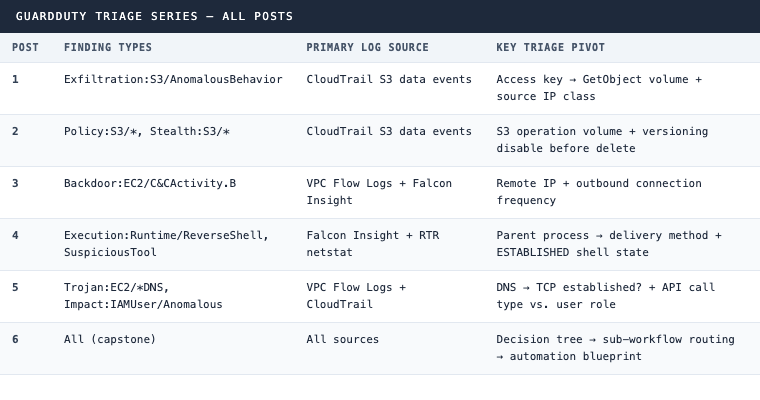
The Alert Backlog Problem
GuardDuty alert backlogs are not a volume problem. An environment generating a few dozen alerts over several months is not burying anyone. The problem is that without a triage workflow, each alert requires the analyst to reconstruct the investigation approach from scratch: which log source is relevant, what pivot to run first, what constitutes an escalation threshold.
That reconstruction time is where backlog accumulates. The alert is not hard to triage. The overhead of figuring out how to triage it is what makes it sit.
Each post in this series eliminates that overhead for one finding type. This post eliminates it for all five at once, through the decision tree and the prompt chain that routes to the right sub-workflow automatically.
Fifteen minutes per alert is achievable for every finding type in this series. With the agent running the sub-workflow on alert receipt, the analyst’s job is to review a structured report and make the containment call, not to rebuild the investigation from a blank console.
The CQL queries run against any Falcon NGSIEM LogScale environment without modification. The AWS CLI commands run against any GuardDuty-enabled account with standard read permissions. Nothing here requires custom tooling.
The remaining open findings in any backlog are not a mystery. They have a path to closure. The question is whether anyone is running the workflow.
Ready to build automated triage for your full GuardDuty detection inventory? See how 543HQ approaches security automation.
Need a hand with this at your company?
543HQ helps startups and growing companies build security programs that actually work. Start with a free 30-minute call.
Book a Free Call