Series: AI Agents as a Security Force Multiplier. Post 4. Originally published on LinkedIn.
Here is a question your QSA will ask during fieldwork:
“Can you show me the list of users with AWS console access, and confirm all of them have MFA enabled?”
If you have 10 IAM users, you can answer that in two minutes. If you have 80, and some are service accounts, and some are from contractors who left six months ago, and you’re not sure which ones still have active access keys. That question turns into a two-day evidence-gathering exercise.
PCI DSS Requirement 8 and SOC 2’s CC6 trust service criteria both require you to demonstrate that access to systems is appropriately controlled, reviewed periodically, and revoked promptly when no longer needed. The auditors aren’t going to take your word for it. They want evidence.
An AI agent with AWS CLI access can generate that evidence package in under two minutes. Here’s exactly how.
The Prompt
The following prompt chain drives the IAM access review. These were run against a Claude Code instance with read-only AWS CLI access configured. The same chain works in any harness with tool-use and multi-step reasoning: OpenClaw, Hermes, or any MCP-connected client.
Prompt 1: Collect IAM state
You have read-only AWS CLI access to the account. Do not analyze yet. Collect the following raw data and confirm when each step is complete:
- Generate and pull the IAM credential report
- List all IAM users with their metadata
- For each user: list group memberships, attached managed policies, and inline policy names and documents
- List all IAM groups and their attached policies
- List all IAM roles and pull each role’s trust policy document
- List all customer-managed policies that are currently attached, and pull the active policy version document for each
- Pull the account password policy
- Check root MFA status from the account summary
Prompt 2: Analyze and generate evidence package
Using the data you collected, generate a structured evidence package. For each finding category, produce a table and include the relevant PCI DSS and SOC 2 control citation.
- Users with console access (password_enabled = true) and no MFA active. Flag service accounts separately from human users where account type can be inferred from naming or policy scope. (PCI 8.4.2, SOC 2 CC6.1)
- Active access keys not rotated in 90 or more days. Include key age in days and last used date. (PCI 8.6.3, SOC 2 CC6.2)
- Users with no console login and no key activity in 90 or more days. (PCI 8.2.6, SOC 2 CC6.2)
- Any policy document, managed or inline, where Action or Resource is a wildcard. Include the principal and policy name. (PCI 7.2.1, SOC 2 CC6.3)
- IAM roles whose trust policy allows principals from outside the account, or where Principal is set to a wildcard.
- Password policy settings that fall short of PCI 8.3 requirements: minimum length 12, password history 12, maximum age 90 days.
Flag root MFA status as a standalone item. Where account type is ambiguous, note it rather than guessing.
What the Agent Runs
The agent executes a sequence of AWS CLI calls, reasons about what it finds, and produces a structured report. No manual pivot tables. No copy-paste from the console.
Step 1: Generate the credential report
The IAM credential report is the foundation. It’s a CSV that AWS maintains for every IAM user in the account: console access status, MFA status, last login, last used access keys, key rotation age.
# Request generation (takes a few seconds to populate)
aws iam generate-credential-report

# Pull the report
aws iam get-credential-report \
  --query 'Content' \
  --output text | base64 --decode
Fields the agent parses from this:
password_enabled: console access enabled?mfa_active: MFA configured?password_last_used: last login timestampaccess_key_1_active/access_key_2_active: active programmatic keysaccess_key_1_last_used_date: last key activityaccess_key_1_last_rotated: key age
Step 2: Enumerate IAM users and group memberships
aws iam list-users --output json
aws iam list-groups --output json
aws iam list-attached-user-policies \
  --user-name <user> --output json  # per user
aws iam list-groups-for-user \
  --user-name <user> --output json  # per user
Step 3: Identify privileged access
# Who has AdministratorAccess?
aws iam list-entities-for-policy \
  --policy-arn arn:aws:iam::aws:policy/AdministratorAccess \
  --output json

# Who has PowerUserAccess?
aws iam list-entities-for-policy \
  --policy-arn arn:aws:iam::aws:policy/PowerUserAccess \
  --output json

# What inline policies exist on users?
aws iam list-user-policies --user-name <user> --output json
aws iam get-user-policy --user-name <user> --policy-name <policy> --output json
Step 4: Check for wildcard policies
# List all customer-managed policies in use
aws iam list-policies --scope Local --only-attached --output json

# For each, get the policy document and look for Action: "*" or Resource: "*"
aws iam get-policy-version \
  --policy-arn <arn> \
  --version-id <version> \
  --output json
Step 5: Find roles assumable from outside the account
aws iam list-roles --output json
# Agent parses trust policies for Principal: "*" or external account IDs
Step 6: Check account-level password policy
aws iam get-account-password-policyPCI Req 8.3 specifies minimum password requirements: length, complexity, history, expiration. The agent compares the current policy against the requirement and flags gaps.
Step 7: Root account activity
# Root last activity is in the credential report
# Additionally check for root MFA
aws iam get-account-summary \
  --query 'SummaryMap.AccountMFAEnabled'
What the Agent Produces
From all of that, the agent generates a structured evidence package.
Finding 1: Console access without MFA
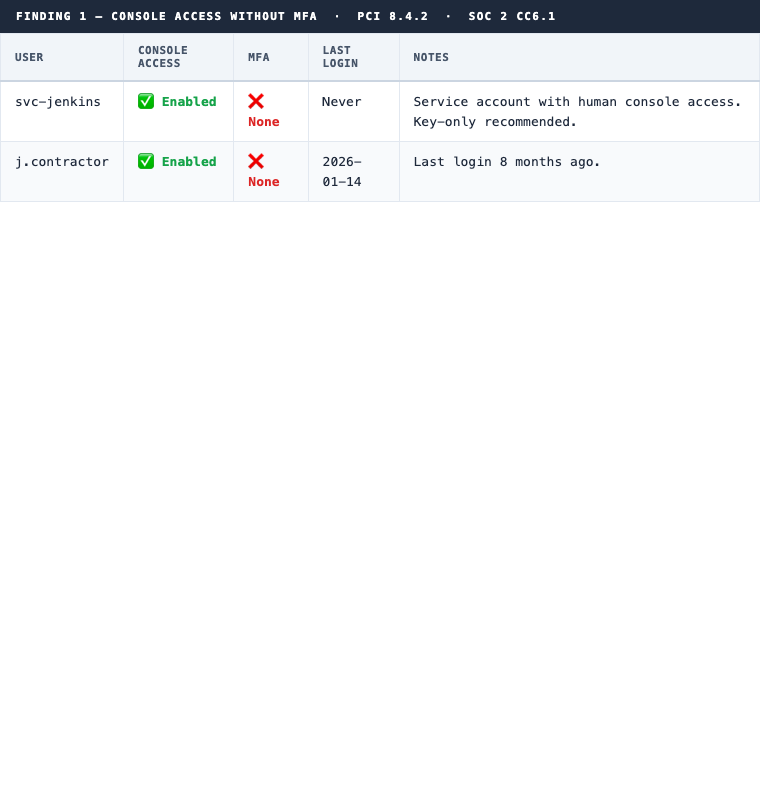
PCI 8.4.2 · SOC 2 CC6.1
Finding 2: Stale access keys (90+ days)
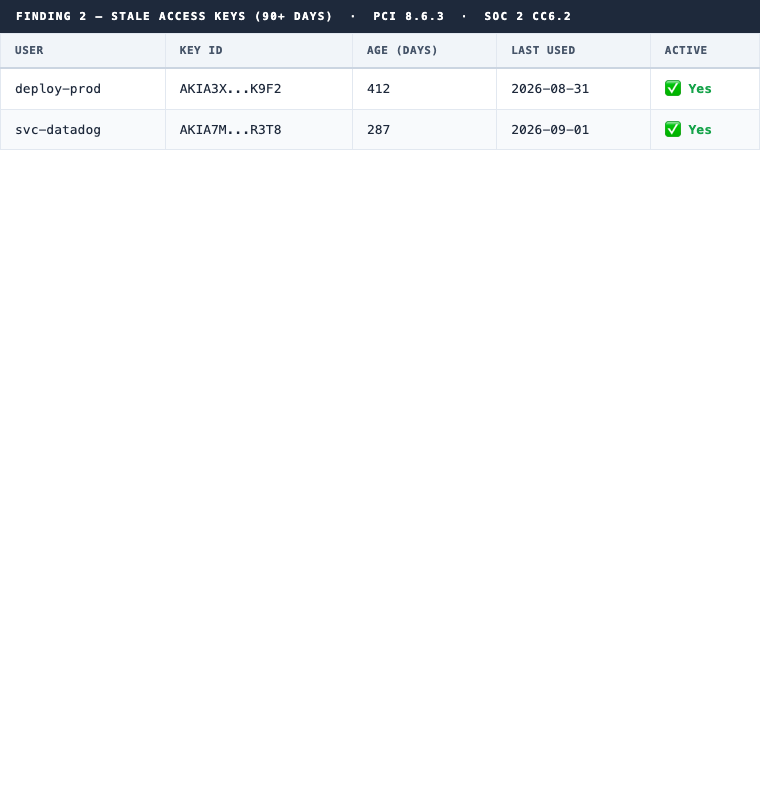
PCI 8.6.3 · SOC 2 CC6.2
Finding 3: Inactive users (90+ days)
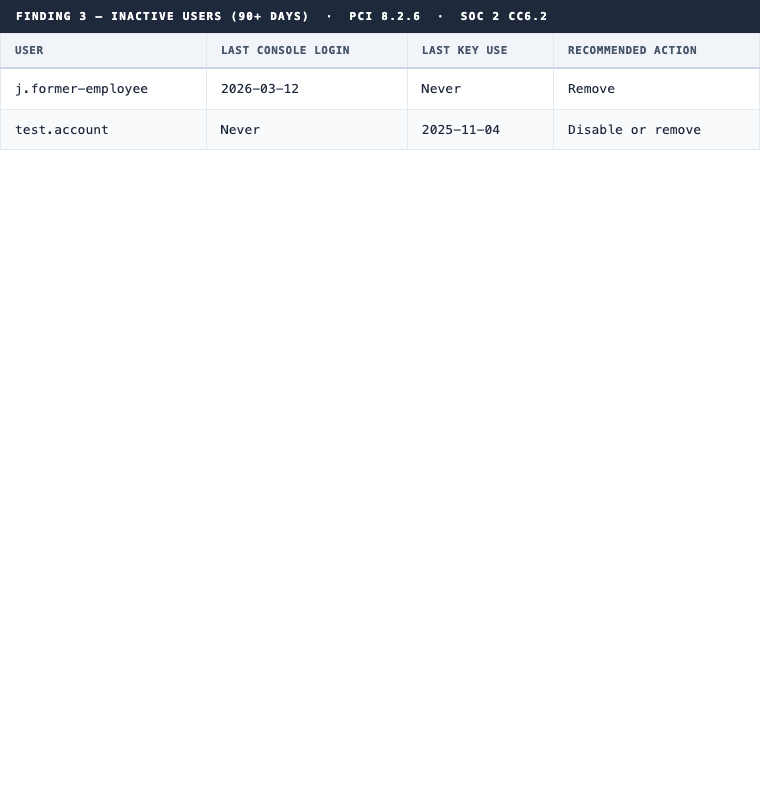
PCI 8.2.6 · SOC 2 CC6.2
Finding 4: Overly permissive policies
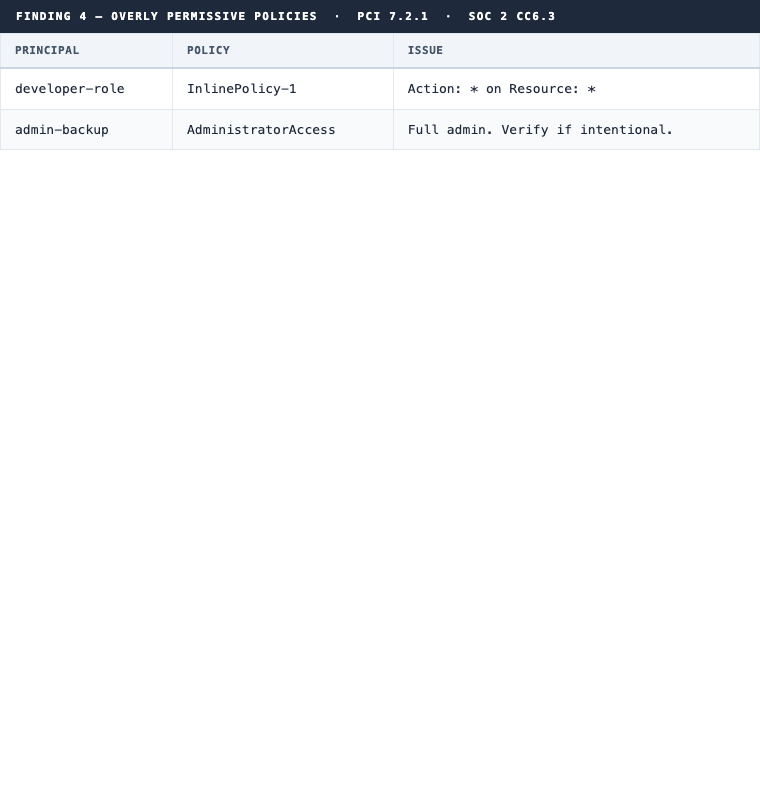
PCI 7.2.1 · SOC 2 CC6.3
Finding 5: Password policy gaps
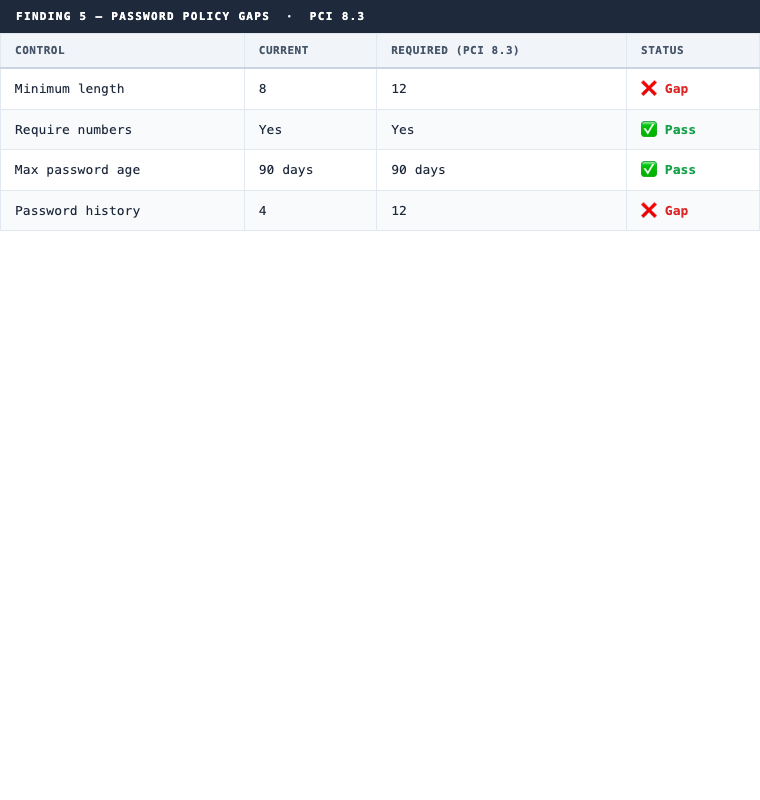
PCI 8.3
Why This Changes the Audit Dynamic
There are two ways to go into an IAM access review with your auditor.
The first way: they ask, you scramble. If you don’t have a GRC platform, that’s three days of credential report exports and spreadsheet work you’re not fully confident in. If you do have one, it’s a different problem: Vanta flagged three things, the auditor is asking about a fourth, and you don’t have an answer because the platform doesn’t monitor it.
The second way: you run the agent before fieldwork starts. You already know every finding, including the ones your platform doesn’t reach. You’ve either remediated each gap or have a documented exception for it. You hand the auditor a formatted package that goes beyond what the platform evidence shows.
The second way doesn’t just save time. It changes your posture. You’re not reacting. You already found everything, decided what to do, and either fixed it or documented the exception.
The gaps GRC platforms typically miss are the ones in this post: customer-managed inline policies with wildcard actions, IAM roles with cross-account trust policies, and password policy settings measured against PCI 8.3’s specific numeric thresholds. Continuous monitoring catches the obvious. The agent catches the rest, and packages the explanation alongside it.
The Permission Model
Same principle as the network diagram post: read-only IAM, no write access.
{
  "Version": "2012-10-17",
  "Statement": [
    {
      "Effect": "Allow",
      "Action": [
        "iam:GenerateCredentialReport",
        "iam:GetCredentialReport",
        "iam:ListUsers",
        "iam:ListGroups",
        "iam:ListRoles",
        "iam:ListPolicies",
        "iam:ListAttachedUserPolicies",
        "iam:ListAttachedGroupPolicies",
        "iam:ListAttachedRolePolicies",
        "iam:ListUserPolicies",
        "iam:ListGroupPolicies",
        "iam:ListRolePolicies",
        "iam:GetUserPolicy",
        "iam:GetGroupPolicy",
        "iam:GetRolePolicy",
        "iam:GetPolicyVersion",
        "iam:ListEntitiesForPolicy",
        "iam:ListGroupsForUser",
        "iam:GetAccountPasswordPolicy",
        "iam:GetAccountSummary"
      ],
      "Resource": "*"
    }
  ]
}
What’s Next in This Series
Each of the following follows the same pattern: read-only AWS CLI access, the agent reasons over the output, structured evidence comes out the other side.
- Encryption sweep: unencrypted EBS, RDS, S3, snapshots (PCI Req 3.5)
- Logging completeness: CloudTrail coverage, log integrity, CloudWatch alarms (PCI Req 10)
- Security group exposure:
0.0.0.0/0analysis, internet-reachable compute (PCI Req 1.3) - Pre-audit gap report: all of the above combined, run the week before your QSA arrives
The pattern holds across every control area. AWS surfaces this data through the API regardless of whether you pull it before fieldwork or during it. Your QSA will find the same gaps either way. The question is who finds them first.
Getting ready for a PCI DSS or SOC 2 review and need a sustainable access review process? See how 543HQ structures compliance programs.
Need a hand with this at your company?
543HQ helps startups and growing companies build security programs that actually work. Start with a free 30-minute call.
Book a Free Call