Series: AI Agents as a Security Force Multiplier. Post 6. Originally published on LinkedIn.
The issue. GRC platforms confirm CloudTrail is enabled and a trail exists. They don’t check whether log file validation is on, whether the S3 bucket holding those logs has access logging enabled, or whether your CloudWatch alarms are connected to SNS topics that have confirmed subscribers.
The implication. PCI DSS Requirement 10 is the longest requirement in the standard: forty-plus sub-controls covering what you log, where you store it, how long you keep it, who can access it, whether it has integrity protection, and whether you have real-time alerts on specific event types. Auditors don’t stop at “CloudTrail is enabled.”
The solution. An AI agent with read-only AWS CLI access checks every one of those sub-controls systematically and produces the evidence package before your QSA starts asking.
The Prompt
The following prompt chain drives the logging completeness sweep. These were run against a Claude Code instance with read-only AWS CLI access configured. The same chain works in any harness with tool-use and multi-step reasoning: OpenClaw, Hermes, or any MCP-connected client.
Prompt 1: Collect logging state
You have read-only AWS CLI access to the account. Do not analyze yet. Collect the following raw data and confirm when each step is complete:
- List all CloudTrail trails including shadow trails; for each, get trail status and event selectors
- For each trail: pull log file validation status, multi-region flag, global service events flag, S3 bucket name, and CloudWatch Logs ARN
- For the CloudTrail S3 bucket: check access logging configuration, versioning, bucket policy, public access block, and lifecycle configuration
- List all CloudWatch log groups with retention settings and stored bytes
- List all CloudWatch metric filters
- List all CloudWatch alarms and their actions (SNS topic ARNs)
- For each alarm’s SNS topic: list subscriptions and their SubscriptionArn status
- Check GuardDuty detector status and finding publish frequency
- Check AWS Config recorder status, delivery channel, and active rules
- List VPC flow logs for all VPCs
Prompt 2: Analyze and generate evidence package
Using the data you collected, generate a structured evidence package. For each finding category, produce a table and include the relevant PCI DSS and SOC 2 control citation.
- CloudTrail trail configuration: multi-region, log file validation enabled, global service events, currently logging. Flag any trail where IsLogging is false separately. (PCI 10.2, 10.3.3, SOC 2 CC7.2)
- CloudTrail S3 bucket hygiene: access logging enabled on the bucket, versioning, lifecycle rule meeting 12-month retention with 3 months immediately available. (PCI 10.7)
- PCI-required CloudWatch alerts: for each of the 10 required event types, check whether a metric filter exists, an alarm is configured, and at least one confirmed SNS subscriber exists. Flag any alarm where SubscriptionArn is PendingConfirmation. (PCI 10.6.1, 10.6.3)
- VPC flow logs: which VPCs have flow logging enabled. Flag any VPC without flow logs where a CDE or in-scope workload might reside. (PCI 10.2)
- GuardDuty status: enabled, finding publish frequency. Flag if disabled or if publish frequency is less than frequent. (PCI 10.6, SOC 2 CC7.2)
- AWS Config recorder: active, delivery channel configured, rules covering PCI-relevant change events. (PCI 10.2, SOC 2 CC8.1)
What the Agent Runs
The agent executes a sequence of AWS CLI calls, reasons about what it finds, and produces a structured report. No console screenshots. No manual cross-referencing of alarms against metric filter patterns.
Step 1: CloudTrail coverage
# All trails across the account, including shadow trails in other regions
aws cloudtrail describe-trails \
  --include-shadow-trails \
  --output json

# Status of each trail (is it actually logging?)
aws cloudtrail get-trail-status \
  --name <trail-name> \
  --output json

# What event types are covered?
aws cloudtrail get-event-selectors \
  --trail-name <trail-name> \
  --output json

# Advanced event selectors (data events: S3 object-level, Lambda invocations)
aws cloudtrail get-insight-selectors \
  --trail-name <trail-name> \
  --output json
The agent checks: Is the trail multi-region? Is it logging management events? Is it logging data events on S3 buckets in scope? Is IsLogging: true, because a trail can be configured but paused.
Step 2: Log file integrity validation
aws cloudtrail describe-trails \
  --query 'trailList[*].{Name:Name,LogValidation:LogFileValidationEnabled,MultiRegion:IsMultiRegionTrail,GlobalEvents:IncludeGlobalServiceEvents}' \
  --output json
Log file validation generates a digest file every hour that can verify the integrity of the log archive. PCI Req 10.3.3 requires protection of audit logs from destruction and unauthorized modification. Most trails have validation disabled. Auditors check this.
Step 3: CloudTrail S3 bucket hygiene
# The bucket where logs land
aws cloudtrail describe-trails \
  --query 'trailList[*].S3BucketName' \
  --output json

# Then for that bucket:
aws s3api get-bucket-logging --bucket <cloudtrail-bucket>  # Is access logging on?
aws s3api get-bucket-versioning --bucket <cloudtrail-bucket>
aws s3api get-bucket-policy --bucket <cloudtrail-bucket>
aws s3api get-public-access-block --bucket <cloudtrail-bucket>
aws s3api get-bucket-lifecycle-configuration --bucket <cloudtrail-bucket>  # Retention policy?
PCI Req 10.7 requires at least 12 months of audit log retention, with 3 months immediately available online. The agent checks the lifecycle policy on the CloudTrail bucket and flags any configuration that doesn’t meet that threshold.
Step 4: CloudWatch log groups and metric filters
# All log groups with retention settings
aws logs describe-log-groups \
  --query 'logGroups[*].{Name:logGroupName,RetentionDays:retentionInDays,StoredBytes:storedBytes}' \
  --output json

# Metric filters: what events are wired to metrics?
aws logs describe-metric-filters \
  --output json
The agent maps existing metric filters against the 10 event types PCI Req 10.6 requires you to alert on. Any event type without a matching filter is a finding.
Step 5: Required CloudWatch alarms and SNS subscribers
aws cloudwatch describe-alarms \
  --output json

# For each alarm's SNS topic, check whether subscriptions are confirmed
aws sns list-subscriptions-by-topic \
  --topic-arn <sns-arn> \
  --output json
This is the step that catches the most common failure mode: the alarm exists, it looks correct in the console, but it’s connected to an SNS topic with no confirmed subscribers. The agent checks SubscriptionArn on each subscription and flags anything sitting at PendingConfirmation.
Step 6: GuardDuty status
# Is GuardDuty enabled in this account/region?
aws guardduty list-detectors --output json

aws guardduty get-detector \
  --detector-id <detector-id> \
  --query '{Status:Status,FindingFrequency:FindingPublishingFrequency,UpdatedAt:UpdatedAt}' \
  --output json
Step 7: AWS Config
# Is Config enabled?
aws configservice describe-configuration-recorders --output json
aws configservice describe-configuration-recorder-status --output json

# What rules are active?
aws configservice describe-config-rules --output json

# Delivery channel (where do Config snapshots go?)
aws configservice describe-delivery-channels --output json
AWS Config is the change-tracking layer. SOC 2 CC8.1 and PCI Req 10 both benefit from Config being active: it records what changed, when, and which principal made the change.
Step 8: VPC Flow Logs
# Are flow logs enabled on CDE VPCs?
aws ec2 describe-flow-logs \
  --filter "Name=resource-type,Values=VPC" \
  --output json
PCI Req 10.2 requires logging all individual user access to cardholder data environments. VPC Flow Logs capture network-level traffic to and from your CDE and provide the network-layer audit coverage that complements CloudTrail’s API-layer records.
The PCI Req 10 Alert Checklist
PCI DSS specifies event types that must generate alerts. The agent checks for a metric filter, a wired alarm, and a confirmed SNS subscriber for each:
# The agent checks for metric filters matching these patterns:

# 1. Root account usage
{ $.userIdentity.type = "Root" && $.userIdentity.invokedBy NOT EXISTS && $.eventType != "AwsServiceEvent" }

# 2. Unauthorized API calls
{ ($.errorCode = "AccessDenied") || ($.errorCode = "UnauthorizedOperation") }

# 3. Console sign-in without MFA
{ ($.eventName = "ConsoleLogin") && ($.additionalEventData.MFAUsed != "Yes") }

# 4. IAM policy changes
{ ($.eventName = DeleteGroupPolicy) || ($.eventName = DeleteRolePolicy) || ($.eventName = DeleteUserPolicy) || ($.eventName = PutGroupPolicy) || ($.eventName = PutRolePolicy) || ($.eventName = PutUserPolicy) || ($.eventName = CreatePolicy) || ($.eventName = DeletePolicy) || ($.eventName = CreatePolicyVersion) || ($.eventName = DeletePolicyVersion) || ($.eventName = SetDefaultPolicyVersion) }

# 5. CloudTrail configuration changes
{ ($.eventName = CreateTrail) || ($.eventName = UpdateTrail) || ($.eventName = DeleteTrail) || ($.eventName = StartLogging) || ($.eventName = StopLogging) }

# 6. Console authentication failures
{ ($.eventName = ConsoleLogin) && ($.errorMessage = "Failed authentication") }

# 7. CMK disable or scheduled deletion
{ ($.eventSource = kms.amazonaws.com) && (($.eventName = DisableKey) || ($.eventName = ScheduleKeyDeletion)) }

# 8. S3 bucket policy changes
{ ($.eventSource = s3.amazonaws.com) && (($.eventName = PutBucketAcl) || ($.eventName = PutBucketPolicy) || ($.eventName = PutBucketCors) || ($.eventName = PutBucketLifecycle) || ($.eventName = PutBucketReplication) || ($.eventName = DeleteBucketPolicy) || ($.eventName = DeleteBucketCors) || ($.eventName = DeleteBucketLifecycle) || ($.eventName = DeleteBucketReplication)) }

# 9. Security group changes
{ ($.eventName = AuthorizeSecurityGroupIngress) || ($.eventName = AuthorizeSecurityGroupEgress) || ($.eventName = RevokeSecurityGroupIngress) || ($.eventName = RevokeSecurityGroupEgress) || ($.eventName = CreateSecurityGroup) || ($.eventName = DeleteSecurityGroup) }

# 10. VPC and route changes
{ ($.eventName = CreateVpc) || ($.eventName = DeleteVpc) || ($.eventName = ModifyVpcAttribute) || ($.eventName = CreateRoute) || ($.eventName = DeleteRoute) || ($.eventName = CreateRouteTable) || ($.eventName = AssociateRouteTable) || ($.eventName = ReplaceRouteTableAssociation) }
The agent checks every one of these against your existing metric filters and reports which are covered and which are missing.
What the Agent Produces
From all of that, the agent generates a structured evidence package.
Finding 1: CloudTrail configuration gaps
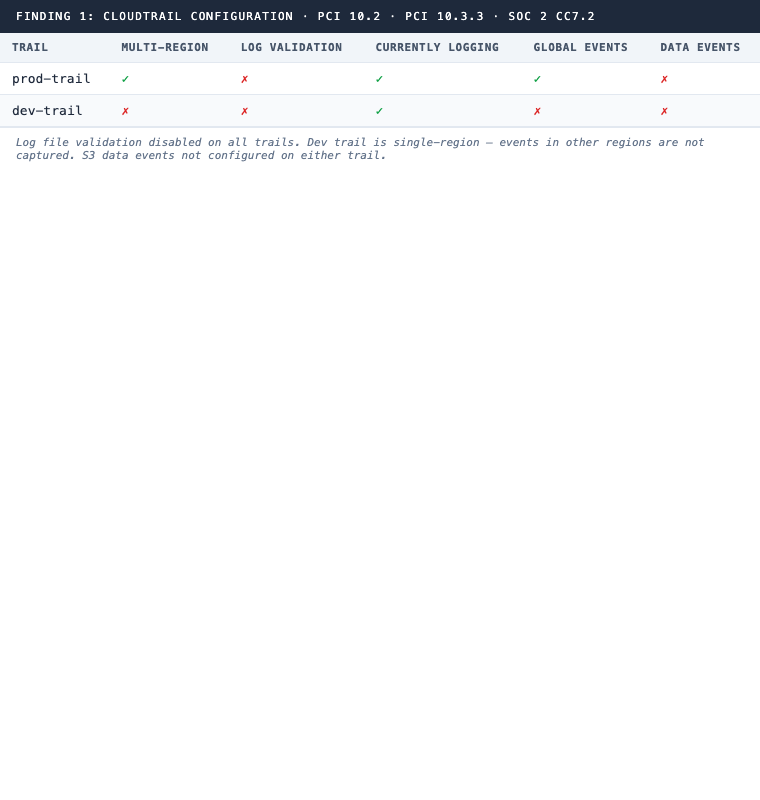
PCI 10.2 · PCI 10.3.3 · SOC 2 CC7.2
Finding 2: CloudTrail S3 bucket retention
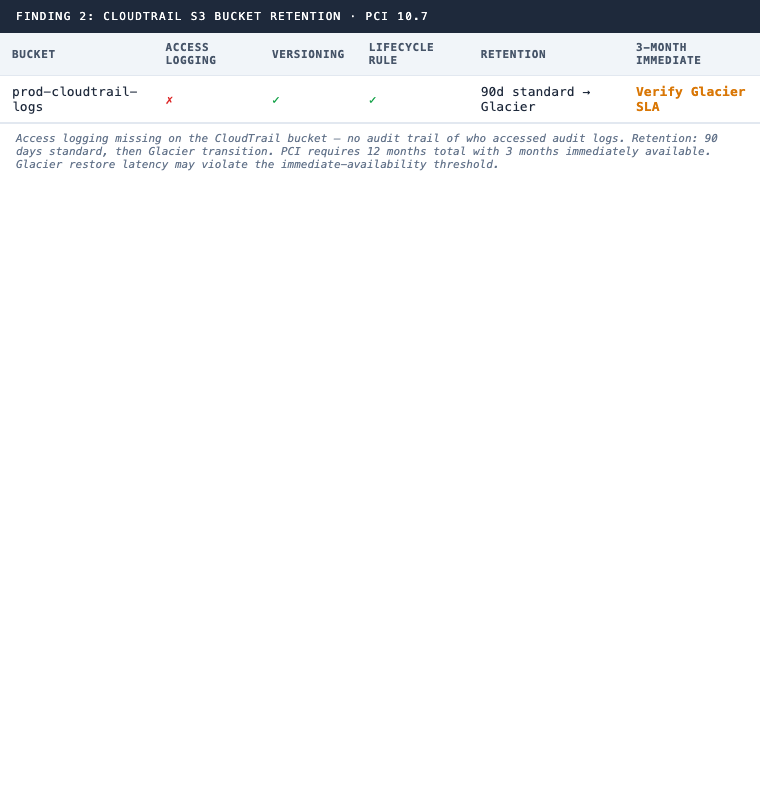
PCI 10.7
Finding 3: Missing PCI-required alerts
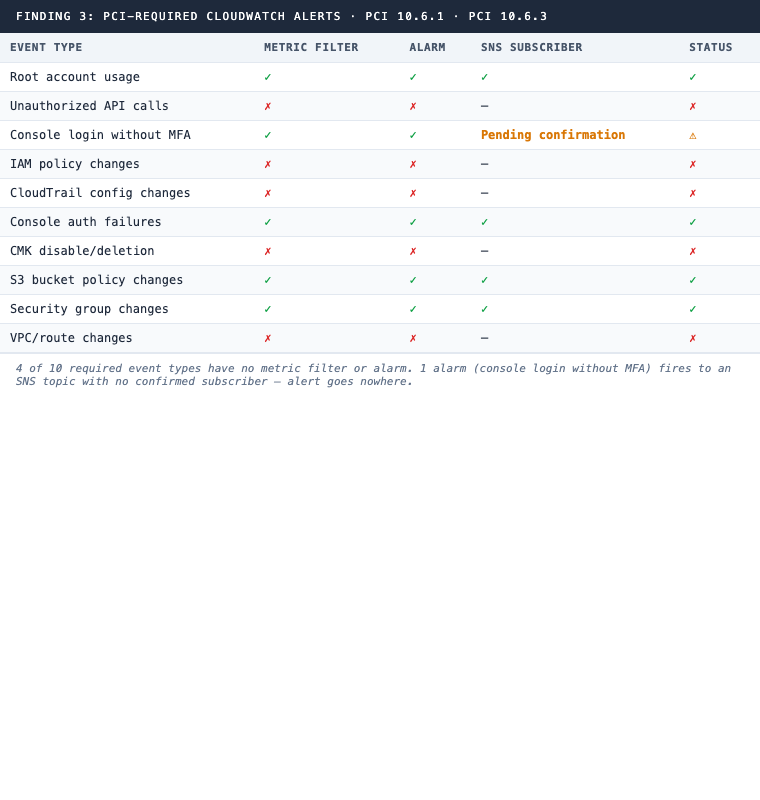
PCI 10.6.1 · PCI 10.6.3
Finding 4: VPC Flow Logs
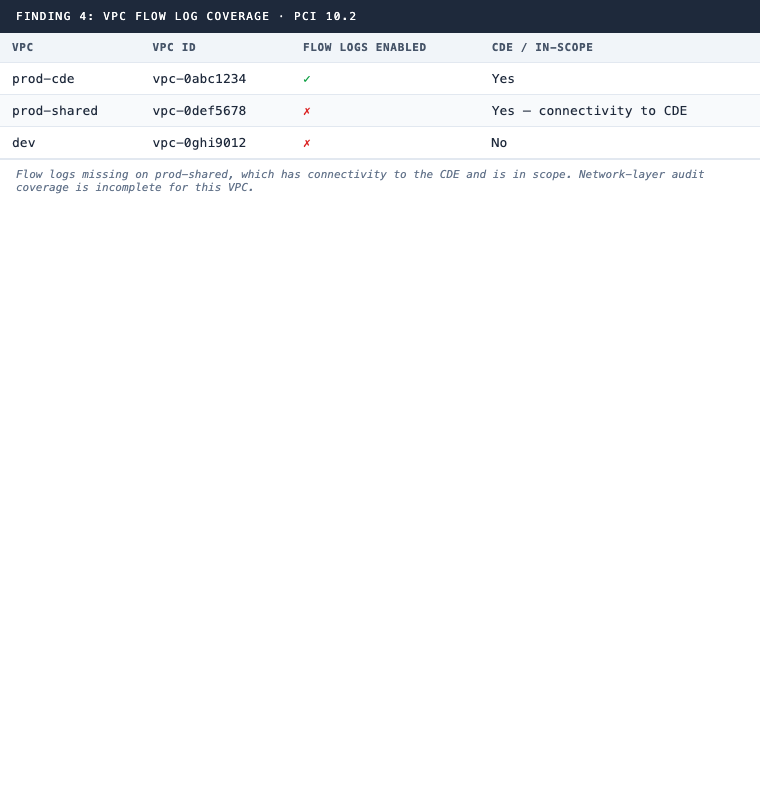
PCI 10.2
The Alarm That Fires Into the Void
The SNS finding deserves its own section.
This is one of the most common audit findings in environments that have done some work toward compliance but never pressure-tested it. The alarm exists. It looks correct in the console. The QSA asks what happens when root logs in, and you say you get an alert. They ask you to demonstrate it. You trigger a test event. Nothing arrives.
Because the SNS topic was created, but the email subscription was never confirmed. Or the subscription was confirmed to a distribution list that was decommissioned when someone left. Or the endpoint is a Slack webhook that stopped working when someone rotated the integration token and the SNS config was never updated.
The alarm is real. The alerting is not.
The agent catches this by calling list-subscriptions-by-topic for every SNS topic attached to a CloudWatch alarm and verifying that at least one subscription shows a SubscriptionArn value that isn’t PendingConfirmation. Two lines of CLI output that the console hides unless you know to look.
Why Logging Findings Are Different
Encryption findings are painful because remediation takes downtime planning. IAM findings are painful because someone has to own the cleanup. Logging findings are painful for a different reason: they’re invisible until you look for them.
Vanta and Drata both check whether CloudTrail is enabled. Neither checks whether log file validation is on, whether the trail’s S3 bucket has access logging enabled on itself, or whether the bucket lifecycle policy actually covers 12 months of retention with the right availability split. They don’t check whether the metric filters covering PCI’s required event types exist, and they definitely don’t check whether the SNS subscriptions behind those alarms have confirmed subscribers.
The gaps GRC platforms typically miss for Requirement 10 are the same gaps that surface hardest during fieldwork: missing log integrity validation across all trails, CloudTrail S3 buckets without access logging (meaning the audit log of your audit logs is missing), and alarms that fire into empty SNS topics. Each one is individually simple. Together, they represent a Requirement 10 posture that looks complete from the dashboard and fails on contact with a real QSA.
The Permission Model
{
  "Version": "2012-10-17",
  "Statement": [
    {
      "Effect": "Allow",
      "Action": [
        "cloudtrail:DescribeTrails",
        "cloudtrail:GetTrailStatus",
        "cloudtrail:GetEventSelectors",
        "cloudtrail:GetInsightSelectors",
        "logs:DescribeLogGroups",
        "logs:DescribeMetricFilters",
        "cloudwatch:DescribeAlarms",
        "sns:ListSubscriptionsByTopic",
        "guardduty:ListDetectors",
        "guardduty:GetDetector",
        "config:DescribeConfigurationRecorders",
        "config:DescribeConfigurationRecorderStatus",
        "config:DescribeConfigRules",
        "config:DescribeDeliveryChannels",
        "ec2:DescribeFlowLogs",
        "s3:GetBucketLogging",
        "s3:GetBucketVersioning",
        "s3:GetBucketPolicy",
        "s3:GetPublicAccessBlock",
        "s3:GetLifecycleConfiguration"
      ],
      "Resource": "*"
    }
  ]
}
What’s Next in This Series
Each post follows the same pattern: read-only AWS CLI access, the agent reasons over the output, structured evidence comes out the other side.
- Security group exposure:
0.0.0.0/0analysis, which compute is actually internet-reachable (PCI Req 1.3) - The capstone: pre-audit gap report: all six checks combined, one report, run the week before your QSA arrives
The question Requirement 10 really asks is not whether you have logging enabled. It’s whether the logging you have would actually surface a security event, and whether someone would know about it in time to respond. Most environments answer that question incorrectly when the QSA tests it.
Preparing for a PCI DSS audit and need to close logging and monitoring gaps before the QSA arrives? See how 543HQ builds audit-ready compliance programs.
Need a hand with this at your company?
543HQ helps startups and growing companies build security programs that actually work. Start with a free 30-minute call.
Book a Free Call